
GeoProp
GeoProp is a section property app that allows you to create your section and find the following geometric properties:
■ centroid.
■ area/transformed area.
■ moments of inertia.
■ section moduli.
■ radii of gyration.
Please note that GeoProp is currently only available on the App Store in Australia, Brunei, Canada, Hong Kong, Indonesia, Japan, South Korea, Macau, Malaysia, New Zealand, Singapore, Taiwan, Thailand, UK, and US.
Please reach out to us if you like to see the App available in your region or if you have any queries.
Who is GeoProp for?
Students: Master your understanding of geometric cross-section properties.
Professionals: Calculate section properties instantly at work and client meetings. Generate PDF report directly from the App. Skip using different apps just to get a particular shape.
Researchers: Quickly evaluate and test custom profile shapes.
Organisations: Equip your entire engineering team with a lightweight, mobile section calculator right at their disposal inside and outside of the workplace.
Break free from network license servers and node-locked keys and let your team work seamlessly anywhere.
Share input files between team members.
Download the Trial Version^ Today.
^Run up to 10 points in the Trial Version for free. Subscribe to the Pro Version to run more than 10 points.

Click here to access the GeoProp blog where we will share examples, tips and tricks, and practical workflows to help you get most out of the app.

Features
■ Quick and reliable for creating section and estimating section properties.
■ Supports metric and imperial unit conversion (mm, cm, m, inch, feet).
■ Create sections manually using coordinates or using templates using solid element and void elements.
■ Homogenous and composite (up to two) materials.
■ Round corners and rotate sections.
■ Customise element line properties (e.g., colours, line types).
■ Save created section for future access.
■ Export results to PDF.
■ Import and export input data from and to .txt file for file sharing. (AVAILABLE NOW!)
Tutorial Videos
Latest Feature
■ Import and export input data from and to .txt file under Files.
■ Sample .txt files below:
■ More sample .txt files here.
■ Note: GeoProp Trial Version can import and open the .txt files for viewing. Download link below.
Highlighted Feature
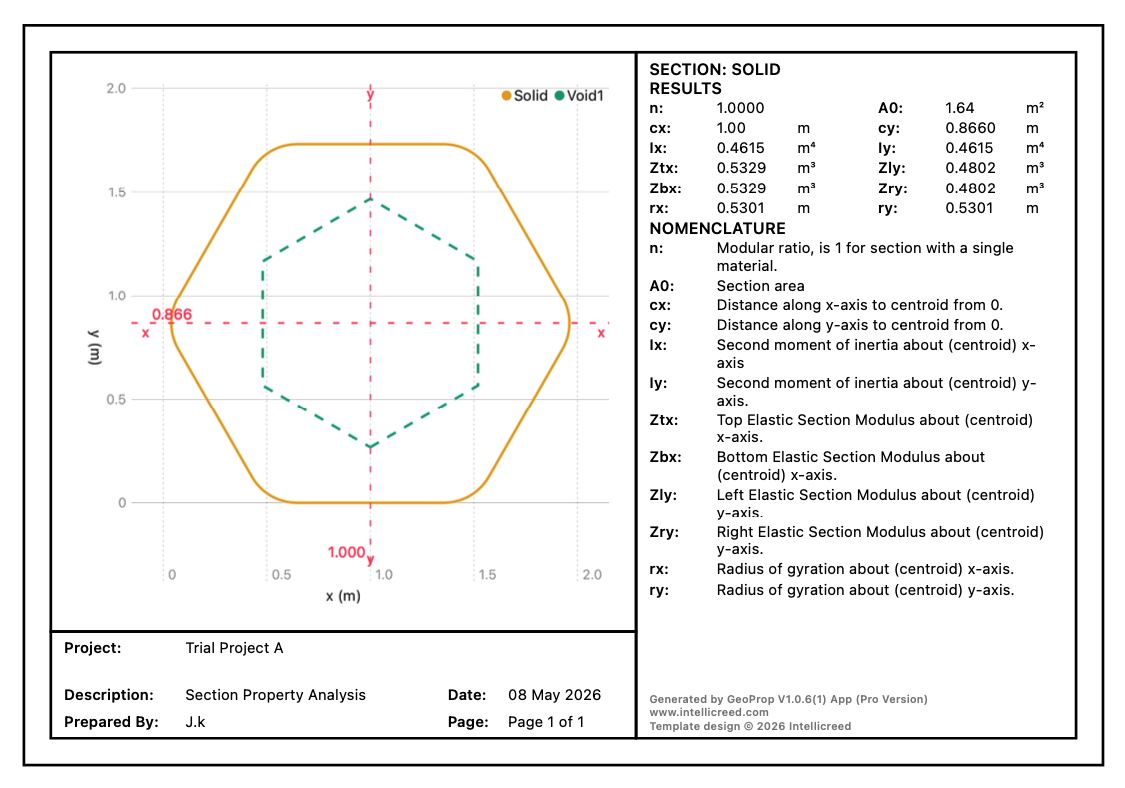
■ Export results to PDF. Try it in the trial version.
GeoProp: Engineering Freedom in Section Design
Our very first step into application development was born out of a tedious, repetitive challenge we faced daily as young engineers involving calculating transformed section properties for flitch beams and composite bridge girders. Carrying out these calculations manually or even attempting to model them in rigid software was incredibly time consuming.
We spent hours tracking parallel axis theorems and modular ratios when we should have been focused on design optimization. A section properties tool that was fast, visual, and highly adaptable had always been at the top of our personal wish list. When we finally decided to build our first app, we knew exactly what problem we needed to solve.
To give users ultimate geometric freedom, we built the engine around a coordinate geometry system, allowing for the creation of completely custom, irregular sections. However, translating this powerful engine into a mobile environment presented an immediate hurdle, that is the screen real estate.
Designing an interface for the limited screen of a mobile device meant we could not just copy desktop software layouts. Our thought process led us to develop a dual input system that is pairing an interactive, responsive chart with a clean coordinate list. This allowed users to visually track their geometry while simultaneously retaining control over individual points.
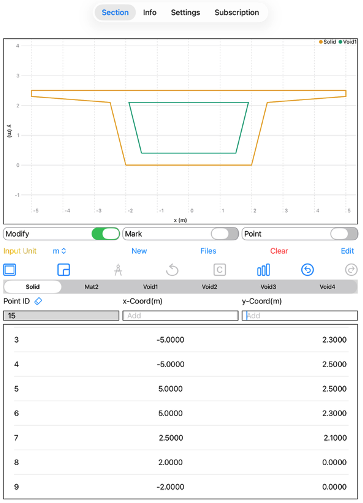
Figure 1: GeoProp User InterfaceEvery subsequent feature was added to solve a practical workflow frustration we had experienced firsthand. We introduced built-in section and shape templates so users could rapidly drop in standard geometries and spend their valuable time modifying specific details rather than drawing basic boxes from scratch. We also implemented a save and open file system, ensuring designs were never lost and could be revisited instantly.
As we refined the app, we tackled the reality of built-up sections which may include fillets and rounded edges. Instead of settling for a basic rounding tool, we pushed the math further, extending the feature to support multiple types of rounding across complex, non-orthogonal corners.
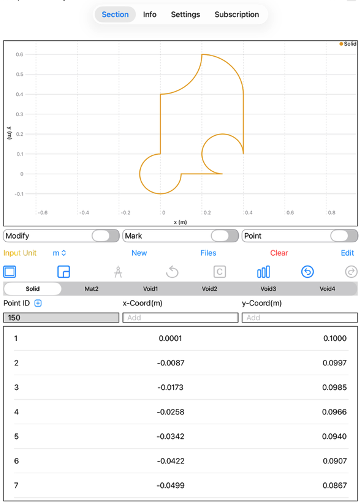
Figure 2: Rounding and fillet options We also knew how frustrating it is to accidentally misplace a coordinate after spending ten minutes perfecting a complex profile. To prevent users from having to manually re-sequence their coordinate points or start over from scratch, we built an undo and redo feature into the app.
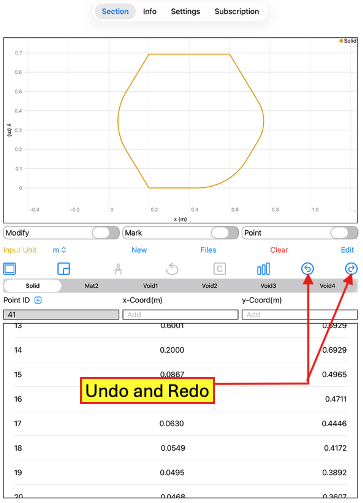
Figure 3: Undo and Redo features Finally, to close the loop on the design process, we recently introduced an export to PDF feature.
This allows engineers to instantly transform their geometric data and calculated properties into polished, professional reports ready for submission or client presentation. GeoProp was built to turn a tedious engineering bottleneck into a fast, intuitive, and mobile experience.
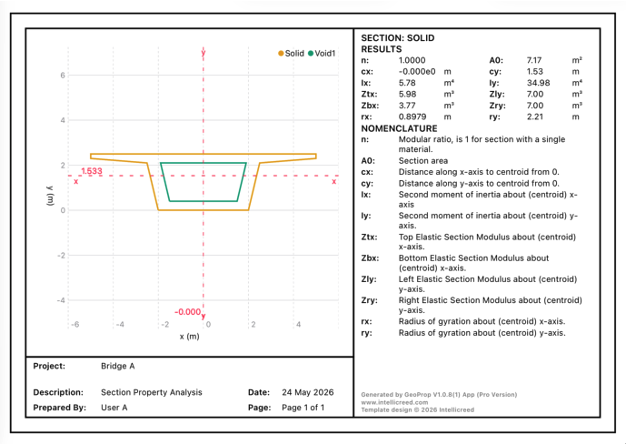
Figure 4: Sample PDF reportWe are incredibly grateful to our active subscribers whose support makes this app possible and keeps us innovating. Please feel free to drop your comments or queries.